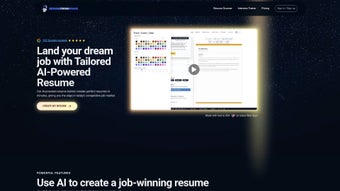

Download ResumeFromSpace – AI‑Powered Resume Builder for Job Seekers
Overview
ResumeFromSpace is a web‑based AI‑driven resume builder that targets modern job seekers who need a fast, reliable, and ATS‑compatible way to craft professional resumes. The platform combines natural‑language processing with a clean, intuitive interface, allowing users to start a new resume from scratch, import existing content, or simply update a previously saved document. Because the tool runs entirely in the cloud, it offers online storage, meaning you can access and edit your resumes from any device—whether you’re on a Windows laptop at home, a MacBook in a coffee shop, or a mobile phone running Android or iOS. The subscription model provides continuous updates, ensuring that the latest industry standards and ATS algorithms are reflected in every export. Privacy is a core principle; all personal data is encrypted and never shared with third parties. In short, ResumeFromSpace streamlines the entire resume creation process, letting you focus on showcasing your career story while the AI handles formatting, keyword optimization, and compliance with employer requirements.
Key Features that Set ResumeFromSpace Apart
- AI‑Enhanced Content Generation: Generates bullet points, summaries, and achievement statements based on your input, ensuring each line is compelling and results‑focused.
- ATS‑Optimized Templates: Every template is built to pass through Applicant Tracking Systems without losing formatting or keywords.
- Real‑Time Keyword Recommendations: Suggests industry‑specific keywords and phrases as you type, improving match rates with job descriptions.
- Cloud‑Based Storage & Version Control: Store unlimited resumes securely, with the ability to revert to previous versions at any time.
- One‑Click PDF Export: Produce high‑resolution, printer‑ready PDFs that retain layout integrity across devices.
- Multi‑Device Compatibility: Fully responsive design works on Windows, macOS, Linux, Android, and iOS browsers.
- Privacy‑First Architecture: End‑to‑end encryption, GDPR compliance, and no data sharing with recruiters or advertisers.
- Integrated Support Hub: Access live chat, a knowledge base, and AI‑driven help articles for instant assistance.
- Continuous Updates: Monthly feature rollouts keep you aligned with evolving hiring trends and ATS updates.
- Collaboration Tools: Share a read‑only link with mentors or career coaches for feedback without exposing your account credentials.
Installation, Usage Instructions, and Compatibility
Getting Started – No Download Required
ResumeFromSpace is a SaaS (Software‑as‑a‑Service) platform, which means there is no traditional installation process. To begin, simply navigate to www.resumefromspace.com using any modern web browser (Chrome, Firefox, Safari, Edge). Click the “Start Free Trial” button, provide a valid email address, and set a secure password. After confirming your email, you’ll be directed to the dashboard where you can choose from a library of pre‑designed templates or start with a blank canvas.
Step‑by‑Step Workflow
- Create a New Project: Click “New Resume” and select the industry‑specific template that matches your target role.
- Input Your Data: Fill out sections for personal information, work experience, education, and skills. The AI will automatically suggest bullet points and quantify achievements based on the role you describe.
- Optimize for ATS: Enable the “ATS Scan” feature to see a real‑time compatibility score and receive keyword recommendations.
- Fine‑Tune Layout: Drag‑and‑drop sections, adjust fonts, and customize colors while the platform maintains structural integrity.
- Export & Share: When satisfied, click “Export as PDF.” You can also generate a shareable link for reviewers.
- Save & Revisit: All changes are saved automatically to the cloud. Return anytime from any device to edit or create new versions.
System Compatibility
Because ResumeFromSpace runs entirely in the browser, it is compatible with the following operating systems and devices:
- Windows 10, 11 (any modern browser)
- macOS Monterey, Ventura, and later
- Linux distributions with up‑to‑date Chromium‑based browsers
- Android 8.0+ (Chrome, Firefox)
- iOS 13+ (Safari, Chrome)
The platform requires a stable internet connection for real‑time AI processing and cloud storage. For offline access, you can download your PDF version and store it locally, but editing will require an online session.
Pros, Cons, and Frequently Asked Questions
Pros
- AI‑driven content suggestions dramatically reduce writing time.
- Templates are specifically designed to pass ATS filters.
- Secure cloud storage ensures resumes are always accessible.
- Responsive design works on any device, from desktop to mobile.
- Continuous updates keep the tool aligned with hiring trends.
Cons
- Requires a subscription for full feature set; no permanent free tier.
- Dependent on internet connectivity for AI features.
- Advanced customization may be limited compared to desktop design tools.
FAQ
Is ResumeFromSpace compatible with all Applicant Tracking Systems?
While no tool can guarantee 100% compatibility with every ATS, ResumeFromSpace follows industry‑standard formatting guidelines and continuously updates its templates based on feedback from major ATS providers such as Taleo, Greenhouse, and Lever.
Can I export my resume in formats other than PDF?
Currently, PDF is the primary export format because it preserves layout across platforms. However, you can copy the content into Word or Google Docs for further editing if needed.
How does the AI ensure privacy of my personal data?
All data is encrypted both in transit (TLS) and at rest (AES‑256). ResumeFromSpace adheres to GDPR and CCPA regulations, and the company does not sell or share your personal information with third parties.
What happens if I cancel my subscription?
Your existing resumes remain stored for 30 days after cancellation, allowing you to download them. After that period, the data is permanently deleted unless you reactivate your account.
Is there a free trial, and how long does it last?
ResumeFromSpace offers a 14‑day free trial with full access to all premium features. No credit card is required to start the trial.
Conclusion & Call to Action
In a competitive job market, a well‑crafted resume can be the deciding factor between landing an interview or being filtered out. ResumeFromSpace combines cutting‑edge AI technology with ATS‑friendly design, offering a seamless experience that saves time while boosting the effectiveness of your application materials. Whether you’re a recent graduate, a mid‑career professional, or an executive looking for a polished executive summary, the platform adapts to your needs and ensures that your achievements are presented in the most compelling way possible. The subscription model provides continuous updates and secure cloud storage, making it a worthwhile investment for anyone serious about advancing their career.
Ready to upgrade your job search toolkit? Start your free 14‑day trial of ResumeFromSpace today and experience the power of AI‑assisted resume building. Secure, fast, and designed for success—your next opportunity is just a click away.



.png)



